Wednesday, August 13, 2014

Important Points in SharePoint Project Management

SharePoint Popularity
According to Microsoft SharePoint is its most sale able product which has 100+ millions users for this technology until now.
A recent Gartner report calls SharePoint “the most widely used document- and collaboration-centered platform.” It  has won the battle for the enterprise.
SharePoint is a top-rated product that will be around for many years to come. If you’re thinking of adopting it then you are driving in right road.

SharePoint – Multiple skills
SharePoint is not one application it’s beyond that. It contains
Content Management
Search- Advanced and Fast
Collaboration
Social Networking- News feed, Discussions, Blog etc.
 Portals- Internal and External
 BI
 LOB Application Connectivity

Support from Other Technologies
SharePoint depends on some other technology and it includes
Windows Server OS
Active Directory
Internet Information Server (IIS)
SQL Server
Active Directory
Domain Name System (DNS)

All these software must need to work properly to work SharePoint in efficient way

Special Skill Required for SharePoint Support
No doubt that SharePoint is easy and implement with consideration of business users but still it require some SharePoint knowledge to manage and operate it. Any business user who have some web handling knowledge can work on SharePoint sites. When it comes to do some configuration settings, Implementation and creating some infrastructure then a SharePoint skilled resource is required

Planning SharePoint Projects
Before starting any SharePoint Project it make sense to do some initial home work. It should cover
Preparing the data dictionary (taxonomy)
Preparing the roles and permission matrix

Planning foe design and development approach (Categorizing the modules to developed using CSOM, SOM and OOB feature)

Wednesday, August 6, 2014

Share Point 2013 App Hosting Types

Hosting Types


Share point Hosted Architecture

Provide Hosted App
Auto Hosted App


Monday, May 26, 2014

Differences between a records archive and in-place records


The following table describes differences between what you can do with records in a record center and with records that are managed in-place in a collaboration site. The differences are presented from the point of view of both records managers and employees collaborating on a project team. 

Note:- This information is taken from MS tech-net site and published in this blog as part of social collaboration cause
Differences between a records archive and in-place records
Factor
Records archive
In-place records
Managing record retention
The content organizer automatically puts new records in the correct folder in the archive’s file plan, based on metadata.
There may be different policies for records and active documents based on the current content type or location.
Restrict which users can view records
Yes. The archive specifies the permissions for the record.
No. Permissions do not change when a document becomes a record. However, you can restrict which users can edit and delete records.
Ease of locating records (for records managers)
Easier. All records are in one location.
Harder. Records are spread across multiple collaboration sites.
Maintain all document versions as records
The user must explicitly send each version of a document to the archive.
Automatic, assuming versioning is turned on.
Ease of locating information (for team collaborators)
Harder, although a link to the document can be added to the collaboration site when the document becomes a record.
Easier.
Clutter of collaboration site
Collaboration site contains only active documents.
Collaboration site contains active and inactive documents (records), although you can create views to display only records.
Ability to audit records
Yes.
Dependent on audit policy of the collaboration site.
Administrative security
A records manager can manage the records archive.
Collaboration site administrators have permission to manage records and active documents.
The following table describes differences between the two records management approaches that might affect how you manage IT resources.
Resource differences between a records archive and in-place records
Factor
Records archive
In-place records
Number of sites to manage
More sites. That is,, there is a separate archive in addition to collaboration sites.
Fewer sites.
Scalability
Relieves database size pressure on collaboration sites.
Maximum site collection size reached sooner.
Ease of administration
Separate site or farm for records.
No additional site provisioning work beyond what is already needed for the sites that have active documents.
Storage
Can store records on different storage medium.
Active documents and records stored together.

Tuesday, April 8, 2014

Configuring the Subscription Proxy applicaton for SharePoint 2013 App

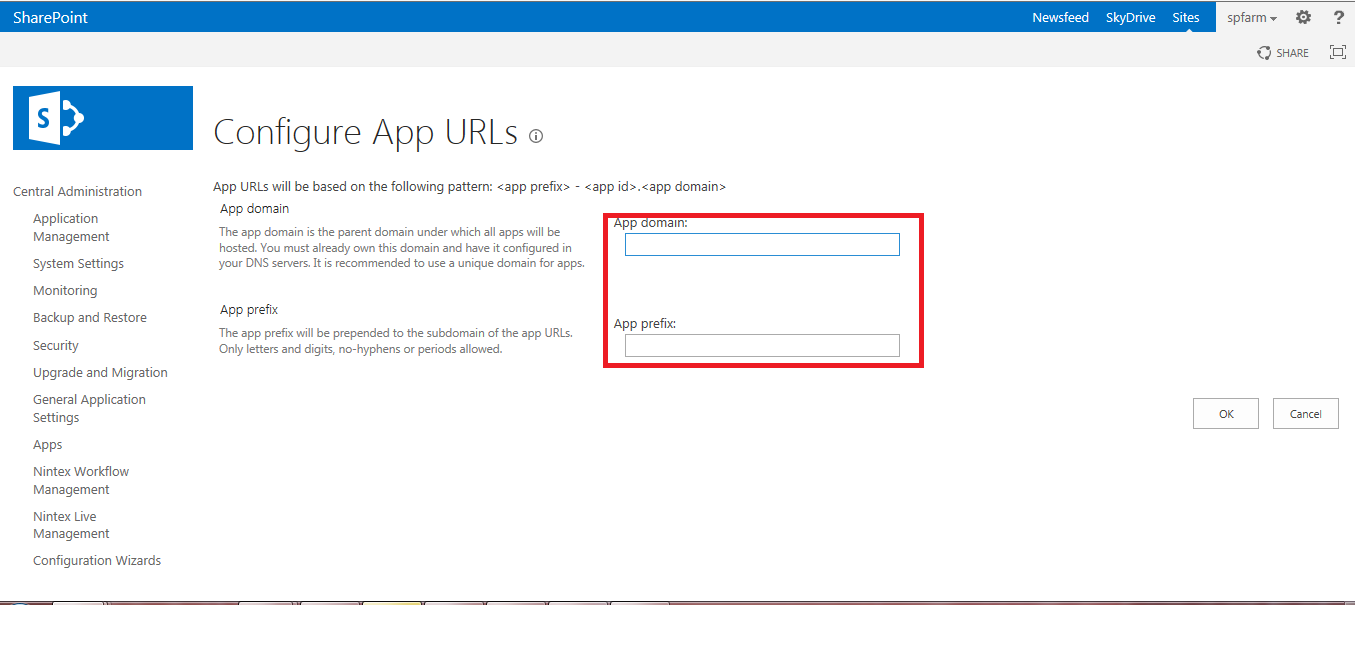
While working with share point 2013 app we need to configure the app URL for share point admin.There are lot of blogs which give you the information related to it. You need to configure the DNS for APP then need to start the App service and subscription service.


I did all these steps but when I tried configure the URL for app from App navigation section I got the following error


"SharePoint The Subscription Settings service and corresponding application and proxy needs to be running in order to make changes to these settings"

The issue with this is  expecting A new service application created on its dedicated App Pool is required to be created in SharePoint

This can be done using Power shell script running with administrator account

add-pssnapin "Microsoft.Sharepoint.Powershell"

$manaccount = Get-SPManagedAccount SP2013Server\Administrator

Remove-SPServiceApplicationPool -Identity SettingsServiceAppPool

$appPoolService = New-SPServiceApplicationPool -Name SettingsServiceAppPool -Account $manaccount

$appService = New-SPSubscriptionSettingsServiceApplication -ApplicationPool $appPoolService -Name SettingsServiceApp -DatabaseName SettingsServiceDB

$proxyService = New-SPSubscriptionSettingsServiceApplicationProxy -ServiceApplication $appService

After executing above script you are able to configure the url for app


Tuesday, March 18, 2014

Comparing SharePoint Designer work flows with Visual Studio work flow


The following table provides a side-by-side comparison of the features and requirements for using SharePoint Designer and Visual Studio to create SharePoint workflows.

Feature / Requirement
SharePoint Designer
Visual Studio
Allows rapid workflow development
Yes
Yes
Enables reuse of workflows
A workflow can be used only by the list or library on which it was developed. However, SharePoint Designer provides reusable workflows that can be used multiple times within the same site.
A workflow can be written as a template so that after it is deployed, it can be reused and associated with any list or library.
Allows you to include a workflow as part of a SharePoint solution or app for SharePoint
No
Yes
Allows you to create custom actions
No. However, SharePoint Designer can consume and implement custom actions that are created and deployed by using Visual Studio.
Yes. However, be aware that in Visual Studio, the underlying activities, not their corresponding actions, are used.
Allows you to write custom code
No
No
Note
This is changed from previous versions. In SharePoint 2013, workflows are declarative only and Visual Studio relies on the visual design surface for workflow development.
Can use Visio Professional to create workflow logic
Yes
No
Deployment
Deployed automatically to list, library, or site on which they were created.
Create a SharePoint solution package (.wsp) file and deploy the solution package to the site (SPWeb).
One-click publishing available for workflows
Yes
Yes
Workflows can be packaged and deployed to a remote server
Yes
Yes
Debugging
Cannot be debugged.
Workflow can be debugged by using Visual Studio.
Can use only actions that are approved by site administrator
Yes
Yes